
Built for the entire burning workflow.
From your first selected file to the final verification report, BurnSure brings the essential steps of optical disc creation into one focused application.
A practical desktop interface.
Create a disc project using an organized graphical interface.
Browse your source files, manage project content and review the information you need before committing to a physical write.
BurnSure's Qt-based desktop application is designed to make technical operations more approachable without hiding relevant details.
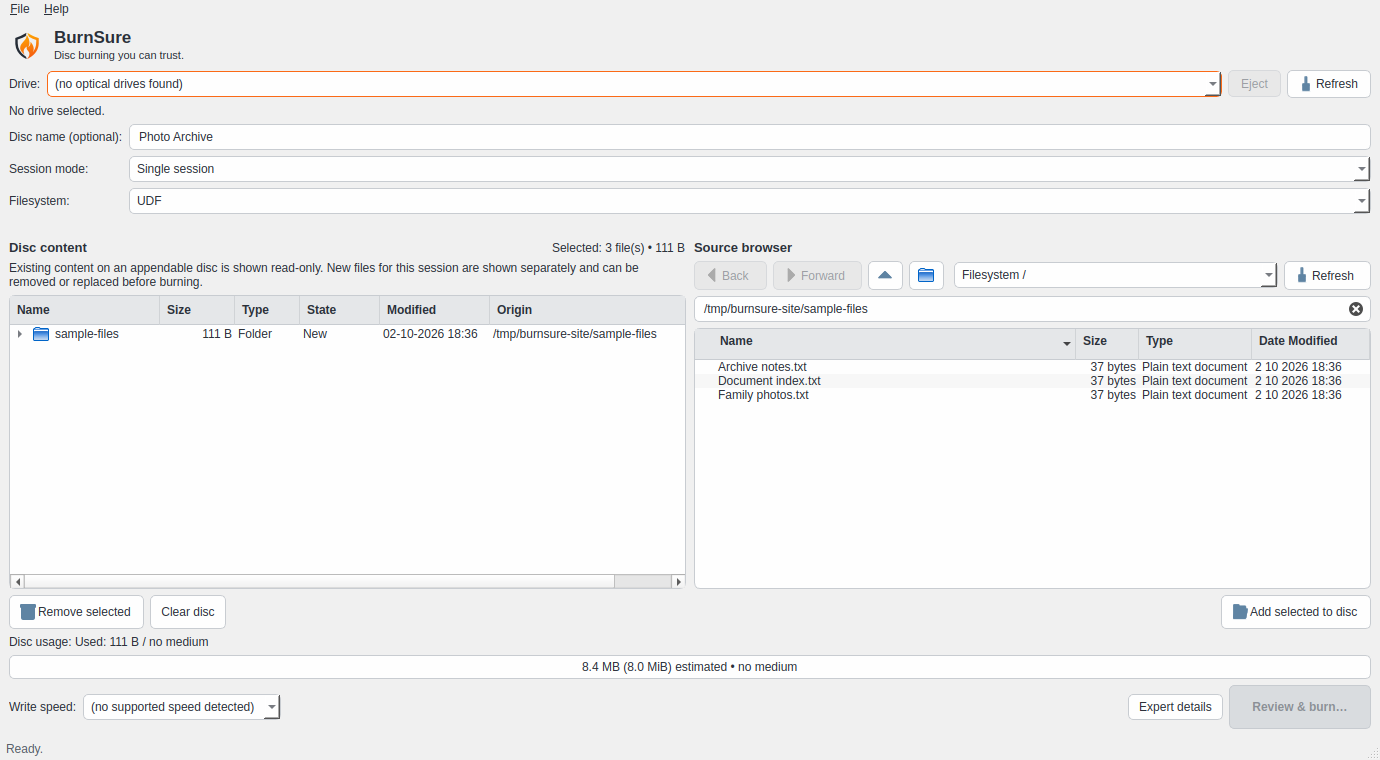
Actual development interface, v0.2.0a5. Demonstration files; no optical drive connected.
UDF 2.60 image creation.
BurnSure prepares regular single-session projects using its UDF 2.60 image-building workflow.
Unicode filenames and nested folder structures are supported, helping preserve the organization of your source material.
Disc-image preparation is a distinct stage, so the content can be checked before the physical write begins.
SHA-256 data verification.
BurnSure can generate a manifest containing information about the original files.
When full verification is selected, recorded content is read back and compared against the original SHA-256 values.
The result is a meaningful distinction between successful writing and successful data verification.
Verification that fits your workflow.
Choose from three single-session verification modes:
Full verification
A complete SHA-256 comparison of the selected files.
Sample verification
A distributed subset of files is selected for checking. Useful when time is limited, but not equivalent to checking every file.
Skip verification
Proceed without post-write content verification when that trade-off is explicitly acceptable.
Experimental multisession operation requires full verification.
Read-only media inspection.
Examine relevant information about the connected optical drive and inserted medium before starting a write.
BurnSure uses available drive and media information to support its preparation and validation process.
Dry-run without physical media.
Explore the workflow without committing data to an optical disc.
Dry-run mode is useful for understanding the application, testing project preparation and checking the simulated process.
Graphical interface and CLI.
Prefer working visually? Use the desktop application.
Want more direct control? BurnSure also provides command-line tools for media inspection, image preparation, verification and related operations.
Both interfaces are built around the same underlying workflow.
Useful diagnostics when something goes wrong.
Optical drives and media do not always behave predictably.
BurnSure records relevant operation details to help distinguish preparation, writing and verification problems.
The project is also developing improved diagnostic export and recovery workflows.
Focused software. Transparent results.
BurnSure is open-source software licensed under GPL-3.0-or-later.
Get Started